How GOAT Email Receipts and Purchase Confirmations Work
When buying sneakers or apparel through GOAT, customers receive digital confirmation emails and receipts that serve as official proof of purchase. These emails are not just transactional messages — they also reflect GOAT’s authentication-based marketplace model, where orders go through verification before delivery.
This guide explains how GOAT email receipts typically look, how they function, and what information they contain, with a focus on the sneaker authentication purchase flow and the anatomy of GOAT order confirmation emails.
Overview of the GOAT Purchase & Authentication Flow
GOAT operates differently from standard e-commerce stores. Instead of shipping directly from a warehouse, most items are sold by individual sellers and routed through GOAT’s authentication facilities.
A typical GOAT order flow looks like this:
Buyer places an order through the GOAT app or website
Seller ships the item to GOAT for verification
GOAT authenticates the product
Item is shipped to the buyer
Buyer receives multiple email confirmations along the way
Each step may trigger a different email, making GOAT’s receipt and confirmation system more detailed than standard retail platforms.
When Customers Receive GOAT Email Receipts
Customers usually receive several emails during the lifecycle of an order:
Order Confirmation Email – Sent immediately after purchase
Authentication Update Emails – Sent when the item is received and verified
Shipping Confirmation Email – Sent once the item leaves GOAT’s facility
Delivery Confirmation Email – Optional follow-up after delivery
The primary proof of purchase is the initial order confirmation email, which includes receipt-style information.
Make it stand out
Anatomy of a GOAT Email Order Confirmation
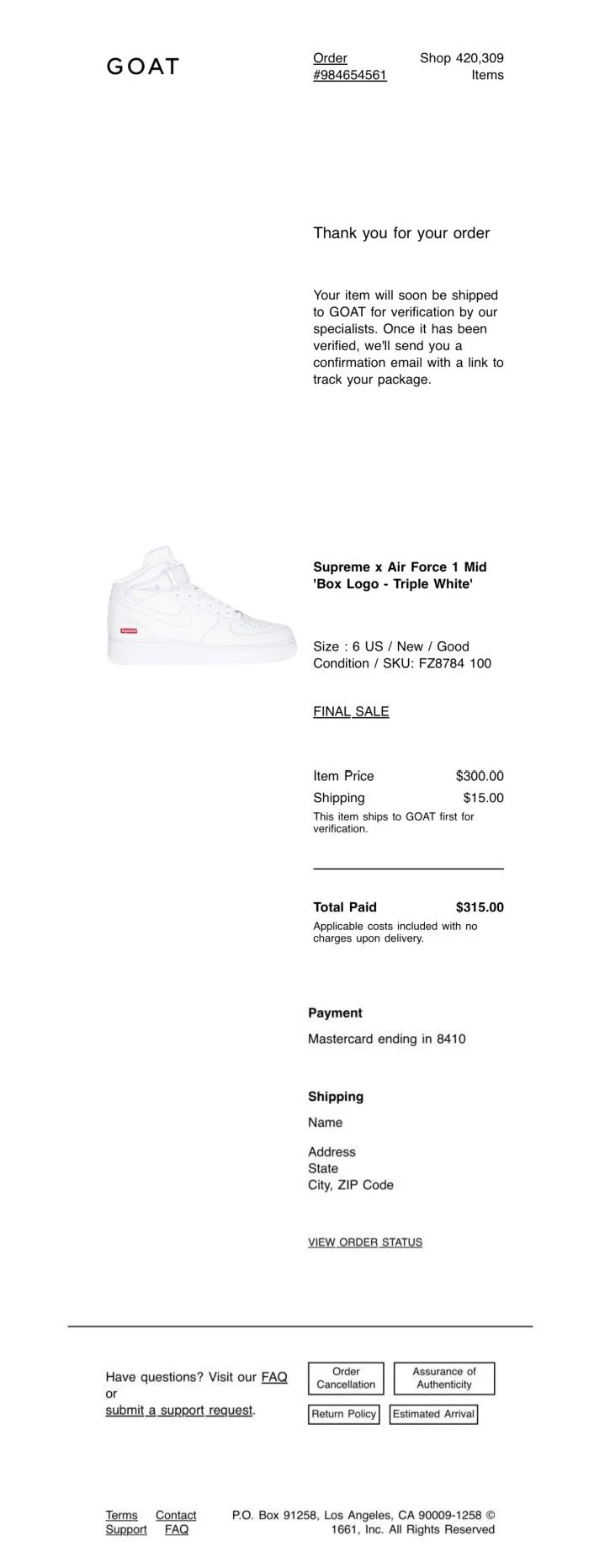
GOAT email receipts follow a clean, minimalist layout optimized for mobile viewing. While exact designs may vary slightly, most GOAT confirmation emails include the following structure:
Header Section
GOAT logo
Confirmation title such as “Order Confirmed” or “Thanks for Your Purchase”
Order reference number
Customer & Order Details
Buyer name or account email
Order date and time
Order ID for tracking and support
Product Information
Product name (e.g., sneaker model or apparel item)
Size and condition (new, used, etc.)
Product images (often included)
Pricing Breakdown
Item price
Authentication or service fees (if applicable)
Shipping cost
Taxes
Total amount paid
Payment Method
Payment type (credit card, PayPal, etc.)
Partial card details or masked payment reference
Footer Information
Customer support links
Order tracking access
Legal or marketplace disclaimers
This structure allows the email to function as both a receipt and an order summary.
Email Receipt vs Printable Receipt on GOAT
GOAT primarily operates with digital receipts, but customers may need a printable version for documentation purposes.
Email Receipts
Sent automatically
Most commonly used as proof of purchase
Optimized for mobile and desktop viewing
Printable or Downloadable Receipts
Accessible through the GOAT account order history
Useful for record keeping, reimbursements, or resale documentation
Often formatted more like invoices
Because resale platforms and sneaker marketplaces rely heavily on documentation, clear receipt formatting is especially important.
Educational Value of GOAT Proof of Purchase Emails
GOAT receipts serve several purposes beyond payment confirmation:
Verifying ownership for resale or consignment
Supporting warranty or insurance documentation
Providing order evidence during disputes
Tracking authentication status
Understanding how GOAT confirmation emails are structured helps users recognize legitimate receipts and maintain accurate records.
Using GOAT Receipt Templates for Documentation
For users who need a visual example or formatted template of a GOAT-style receipt, tools like the GOAT receipt generator can help illustrate how these confirmation emails are typically structured.
You can explore a GOAT-style receipt template here:
👉 https://repreceipt.net/goat-receipt-generator
For broader customization across platforms, the main receipt tool is available here:
👉 https://repreceipt.net/rep-receipt-generator
These tools are intended for presentation, record keeping, and educational purposes, allowing users to understand standard receipt layouts used by online marketplaces.
Frequently Asked Questions (FAQ)
What does a GOAT email receipt include?
A GOAT email receipt typically includes order ID, product details, pricing breakdown, payment method, and order status information.
Is the GOAT order confirmation the same as an invoice?
Not exactly. The order confirmation acts as a receipt, while invoice-style layouts may be available within the user account for printing or documentation.
Do GOAT receipts show authentication status?
Initial receipts do not confirm authentication, but follow-up emails update the buyer once the item passes verification.
Can GOAT email receipts be used as proof of purchase?
Yes. GOAT email confirmations are commonly used as official proof of purchase for resale, insurance, or personal records.
Final Thoughts
GOAT email receipts reflect the platform’s unique sneaker authentication workflow. By combining order confirmation, verification updates, and shipping notices, GOAT provides detailed digital documentation for every purchase.
Understanding how these receipts are structured helps buyers manage records, verify purchases, and recognize authentic confirmation emails — while also offering insight into how modern marketplace receipt systems function.